

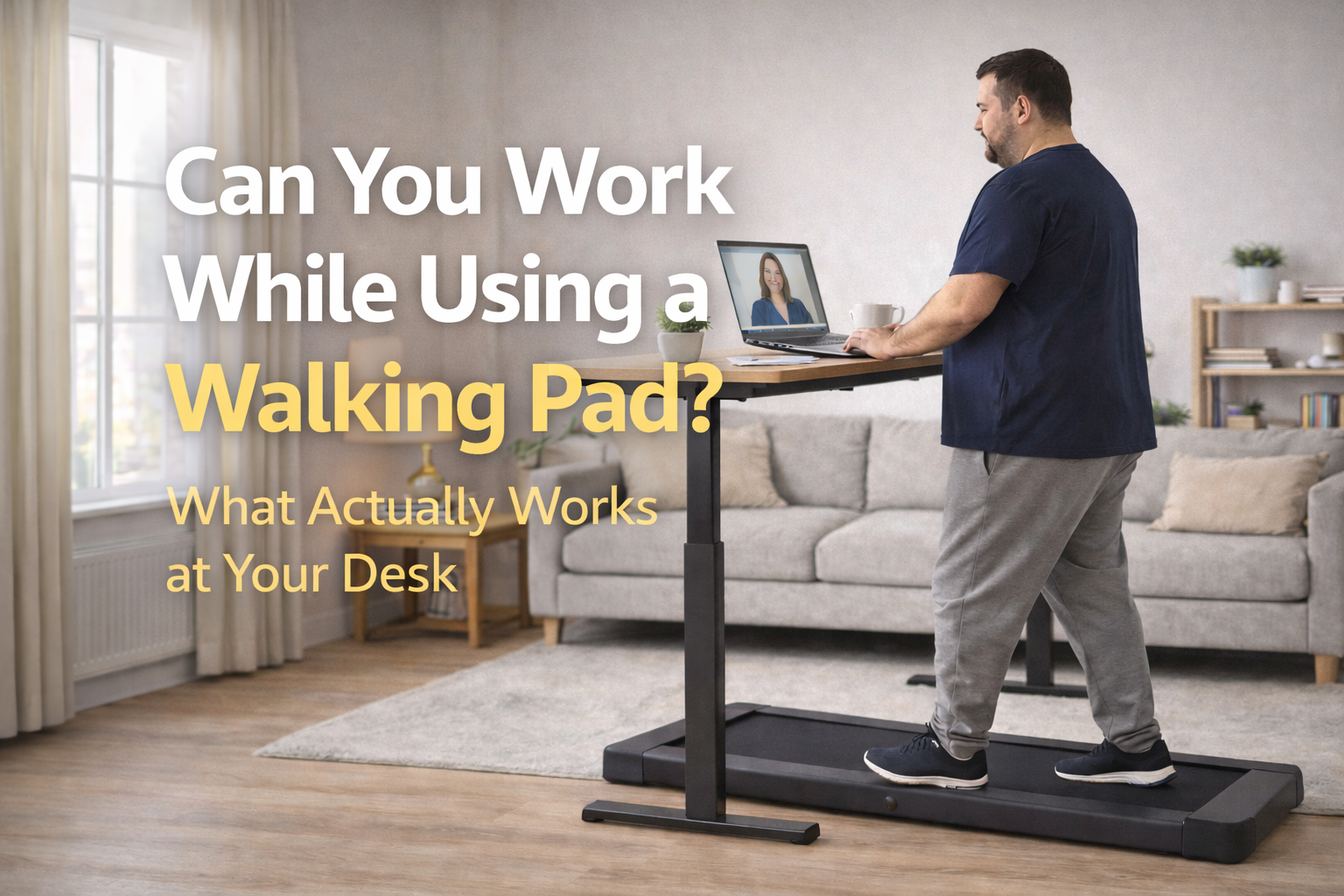
Can You Work While Using a Walking Pad?
Yes, you can work while using a walking pad, but it works best at slower speeds and for lighter tasks. Emails, meetings, calls, admin, inbox clearing, brainstorming, and content planning are usually realistic. Deep-focus writing, precise spreadsheet work, fiddly design tasks, and anything that needs very accurate mouse control are much harder.
That is the honest answer most people need. Walking while working is real, but it is not magic. It can help you sit less, move more, and make your home-office routine more active, but it only works well when your speed, desk setup, and expectations are sensible.
Jump to:
Why trust this guide?
I come at this from the angle of realistic home routines, not gadget hype. My own weight-loss journey started after reaching around 27 stone, and a big part of making movement work has been lowering friction rather than trying to force perfect workouts every day.
That is why this guide is about what actually works in a normal home office, not what sounds clever in marketing copy. You can read more about me here, and if you want support on the food side too, you can also grab my free meal plan here.
Quick answer
Yes, you can absolutely work while using a walking pad, but not every kind of work.
If your job includes calls, meetings, emails, admin, planning, reading, light editing, or idea generation, a walking pad can fit surprisingly well. If your work involves precise design, heavy typing bursts, deep analytical tasks, or detailed spreadsheet and mouse work, walking at the same time may feel more annoying than helpful.
The secret is not trying to walk at “exercise speed.” Slow, easy walking is what makes a treadmill-desk setup usable. Once you try to do too much at once, both your work and your walking tend to get worse.
Does working while walking actually help?
For many people, yes. The biggest benefit is not that it turns work into a workout. It is that it helps reduce long stretches of sitting and makes movement easier to fit into a normal day.
That matters because a treadmill workstation study found overall daily physical activity increased after adoption of treadmill workstations. In other words, the biggest win is often consistency and reduced sedentary time, not athletic performance.
That lines up with how most people actually use them at home: not as a hardcore fitness tool, but as a way to build extra steps into a day that would otherwise be mostly chair-based.
What work tasks are realistic while walking?
This is where a walking pad desk setup shines.
Tasks that usually work well
- emails and inbox clearing
- Zoom or Teams calls
- internal meetings where you mostly listen
- brainstorming and idea mapping
- reading documents
- reviewing notes
- light admin and calendar work
- watching training or webinar content
These are the sorts of tasks where gentle movement can actually feel nice. You are not demanding precision from your hands every second, so the walking becomes background movement rather than a battle for attention.
Tasks that can work with practice
- light typing
- content outlining
- drafting simple copy
- basic project management tools
- responding to messages in Slack or Teams
These tasks often improve once you get used to the setup, especially if your speed is low enough and your desk is set to the right height.
What tasks are harder while walking?
This is where you need to be honest with yourself.
Tasks that are usually much harder while walking
- deep-focus writing
- detailed spreadsheet work
- precise mouse work
- graphic design or photo editing
- coding that needs heavy concentration
- video editing
- anything that already feels mentally demanding
These tasks are not impossible, but they are often where the treadmill-desk fantasy breaks down. Walking and thinking are fine together. Walking and precision are a much trickier combo.
That is also why I do not like the all-or-nothing version of this topic. A walking pad does not need to work for every task to be useful. If it works brilliantly for two or three hours of lighter work each day, that can still be a huge win.
What speed should you use while working?
Slow. Slower than most people expect.
The general logic behind treadmill-desk use is that walking should stay easy enough not to dominate your attention. Guidance on treadmill desks commonly points toward very slow walking rather than normal outdoor walking pace, especially if you are trying to work for longer periods.
That makes sense in real life. If you are trying to answer emails or sit in a meeting while striding along at a pace that feels like exercise, you are doing too much. For work, think “gentle background movement,” not “cardio session.”
A practical speed mindset
- Calls and meetings: easiest place to walk a little longer
- Emails and admin: low, steady speed works best
- Typing-heavy tasks: very low speed, or stop walking temporarily
- Deep-focus work: often better done standing still or sitting
If your form starts getting messy, your shoulders creep up, or your typing goes to pieces, slow down.
Desk setup and posture tips
This is the part people skip, and it matters.
Walking while working is much more comfortable when your screen, desk height, keyboard, and mouse are set up properly. Ergonomic guidance for treadmill desks generally points back to neutral posture: head and neck in line with the torso, elbows close to the body and bent roughly around a right angle, and the screen placed high enough that you are not constantly looking down.
That means a proper standing desk setup matters much more than just owning the walking pad.
Quick setup checklist
- screen near eye level
- elbows relaxed, not flared out
- desk height set so wrists are not bent awkwardly
- keyboard and mouse positioned to avoid reaching
- walking speed low enough to keep posture calm
- good trainers or comfortable footwear
If you are looking down at a laptop on a normal desk, you are setting yourself up for a worse experience. A standing desk or properly raised workstation is what makes under-desk walking realistic.
Do you need a standing desk for a walking pad?
If you want to work while walking, yes, in practice you usually do.
A walking pad on its own is great for TV walking, step goals, or casual home use. But if your goal is proper under-desk working, a height-adjustable desk makes the whole setup far more usable.
Without that, most people end up hunched, looking down, and wondering why the whole idea feels awkward.
Who a walking pad desk setup suits best
This kind of setup usually works best for:
- people who work from home several days a week
- people with lots of calls or meetings
- freelancers and creators doing admin-heavy work
- people trying to increase daily steps without leaving work unfinished
- beginners who want low-friction home movement
- people who hate sitting still for hours
It is especially good if you already know you struggle with long sedentary days. That is where a walking pad can make a genuinely practical difference.
Who should probably not bother?
Not everyone will love this.
A walking pad desk setup may be a poor fit if:
- your job demands constant precise typing or mouse control
- you get motion sick or find moving while focusing unpleasant
- you do most of your serious work in deep-focus blocks
- you do not have room for a proper standing-desk setup
- you will resent the extra faff of adjusting your workstation
That does not mean a walking pad is useless. It may just mean you will get more value from using it before work, after work, or during meetings rather than trying to force it into every task.
Does walking while working hurt productivity?
Sometimes a little. Sometimes not at all. It depends on the task.
For simple or repetitive work, a walking pad often feels fine and may even make the day feel more energised. For complex tasks, your productivity may drop if you try to do too much at once.
The realistic goal is not “replace all seated work forever.” The better goal is “replace some low-value sitting with easy movement.” That is a much more believable and sustainable target.
Best WalkingPad options for working from home
WalkingPad R3 — best fit for dedicated under-desk use
The R3 is one of the cleanest fits for this post because it is directly positioned for work-and-walk use, with a quiet 6 km/h motor and foldable storage. If your goal is a true home-office walking setup rather than general casual use, this is the sort of model that makes the most sense.
Check current WalkingPad UK options here
WalkingPad A1 Pro — best if you also care about general home walking
If you want a more flexible home-use machine that can still work in a desk setup but also suits ordinary walking sessions away from the desk, the A1 Pro is a strong all-rounder.
It is especially appealing if you want one machine to handle both workday movement and simple daily steps.
Browse the WalkingPad walking-pad range
Amazon fallback if you want broader desk-treadmill options
If you are price-sensitive or want a wider mix of under-desk treadmill shapes and desk-compatible alternatives, Amazon is still useful as a fallback.
See Amazon under-desk treadmill options
My honest take
Yes, you can work while using a walking pad. The trick is not treating it like a stunt.
If you keep the speed low, choose the right tasks, and set your desk up properly, it can be a really practical way to add movement to a work-from-home day. If you expect it to feel effortless while doing intense focus work, you will probably be disappointed.
The sweet spot is using it for the parts of your day that are already low-intensity: admin, emails, meetings, reading, planning, and calls. That is where a walking pad tends to shine.
People also ask
Can you type while using a walking pad?
Yes, but it is easier at very slow speeds and for lighter typing rather than long, intense writing sessions.
Can you use a walking pad for meetings?
Yes. Meetings and calls are often one of the easiest ways to use a walking pad while working, especially if you are mostly listening or speaking rather than typing constantly.
What speed should I use on a walking pad while working?
Use a slow speed that lets you keep calm posture and steady focus. If your typing or concentration falls apart, slow down.
Do I need a standing desk for a walking pad?
If you want to work while walking, a standing desk or properly raised workstation usually makes the setup far more practical.
Are under-desk treadmills worth it for working from home?
They can be very worthwhile if you spend long hours sitting and want an easier way to add movement to calls, meetings, admin, and other light desk tasks.
Can I use a walking pad all day while working?
Most people will not want to walk all day. It usually works better in blocks during lighter tasks rather than continuously for every kind of work.

FAQ
Can you work on a computer while using a walking pad?
Yes, especially for lighter tasks such as emails, calls, reading, and admin. More precise work is usually harder while walking.
Is walking while working distracting?
It can be at first. Most people find it easier once they slow the speed down and match it to the right kind of task.
Can a walking pad replace standing at a desk?
Not completely. Many people benefit from alternating between sitting, standing, and walking rather than doing only one of them all day.
Are walking pads good for home offices?
Yes, especially if you have a standing desk and want a compact way to reduce sitting time and add light movement during the day.
Is a walking pad better than a treadmill for work?
Usually yes. Walking pads are more compact, quieter, and designed for slow walking, which makes them more suitable for desk work than larger running treadmills.
Can walking while working help with weight loss?
It can support weight loss by increasing daily movement and reducing sedentary time, especially when combined with a wider routine you can stick to.
Related reading
Friendly note: This article is based on product research, home-office practicality, and lived experience rather than personal medical advice. If you have balance problems, pain, or a condition that affects gait or posture, get personalised advice before starting a desk-walking setup.
Discover more from Healthy Weight Loss GLP1
Subscribe to get the latest posts sent to your email.
One thought on “Walking While Working: What You Can and Cannot Do on a Walking Pad”
Comments are closed.