
The best free barcode scanner calorie counter in the UK is CaveCals: scanning is free, needs no account, and anything you’ve scanned before adds instantly. Cronometer and Yazio also scan barcodes free, while MyFitnessPal and Lose It! now list barcode scanning as a paid Premium feature.
Last updated: 10 November 2026 · By Alan Spicer
Not medical advice. I share what has worked for me on GLP-1 medication and link the evidence. Talk to your GP or prescriber before changing your diet, medication or activity.
If you have, or have had, an eating disorder, speak to your GP before counting calories. Beat offers UK support.
I like the barcode scanner in CaveCals for anything that comes in a packet: scan it once and it’s logged, and next time it adds instantly. Barcode scanning used to be free everywhere. It isn’t any more, so here’s which apps still let you scan for free in the UK and how to get accurate numbers from a label.
Why listen to me
I have been on GLP-1 medication since January 2024 and lost 7 stone in 18 months. I’m not a doctor or dietitian: I share what worked for me, what didn’t, and the evidence behind it. My day job is YouTube consulting, which you can read about on alanspicer.com.
⚡ QUICK ANSWER
The best free barcode scanner calorie counter in the UK is CaveCals, which includes barcode scanning, food search and a calorie plan in its free version with no account needed. Cronometer and Yazio also scan barcodes free. MyFitnessPal and Lose It! list barcode scanning as a paid Premium feature.
Which calorie counters have a free barcode scanner?
CaveCals, Cronometer and Yazio include barcode scanning in their free versions. MyFitnessPal and Lose It! both list barcode scanning as a Premium feature on their own pages, so you’d pay to scan in those apps.
| App | Barcode scanning free? | Other free features | Paid plan (UK App Store) |
|---|---|---|---|
| CaveCals | Yes | Search, calorie plan, macros, weigh-ins, Quick Add; 10 free photo/voice logs | £4.99/month or £39.99/year |
| Cronometer | Yes | Detailed nutrient tracking | Gold £8.99–£9.99/month, £59.99/year |
| Yazio | Yes | Calorie counter, recipes (with ads) | Pro £9.99–£47.90 range |
| Nutracheck | Yes, but Lite has daily diary limits after a 7-day trial | UK food database | From £3.99/month |
| MyFitnessPal | No (Premium) | Food, exercise and weight tracking | £7.99–£15.99/month |
| Lose It! | No (Premium) | Calorie tracking, plan, community | £9.99–£75.99 range |
Source: each app’s UK App Store listing and official site, checked 7 November 2026.
How does CaveCals’ barcode scanner work?
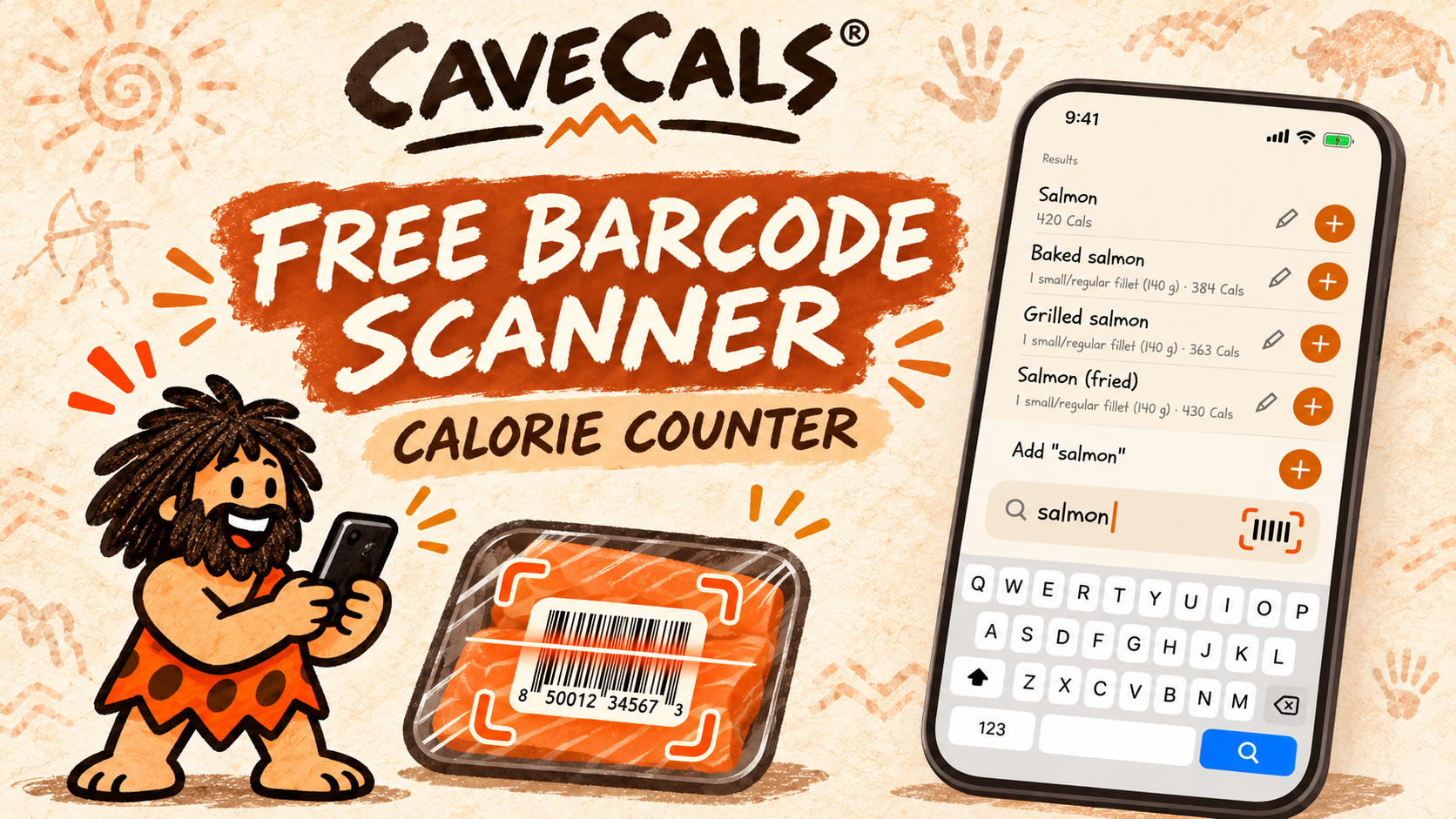
CaveCals’ barcode scanner reads the pack’s barcode and pulls in the calories and macros. You set how much you ate, and the food is logged. Anything you’ve scanned before adds instantly the next time, so your regular products become one tap.
I like the barcode scanner for anything in a packet: it takes the figures straight from the label, so there’s no searching or guessing. It’s free, and so is the rest of the logging (typing, search, Quick Add and saved meals).
Scan for free
CaveCals’ barcode scanner is free with no account needed. Download it and scan the next thing you eat from a packet.
Free on iPhone and Android. iPhone code ALANSPICER: one month free on the yearly plan.
How accurate is barcode scanning?
Barcode scanning is usually the most accurate way to log packaged food because it uses the manufacturer’s label. The two things that throw it off are portion size and recipe changes.
- Portion size: a “serving” on the pack may be smaller than what you eat. Weigh it or count it, then adjust.
- Recipe changes: manufacturers sometimes change recipes; if the scanned figures don’t match the label in your hand, use the label.
- Cooked weight: pasta and rice labels often show dry weight; log the dry amount you cooked, not the cooked weight.
UK food labelling is set by the Food Standards Agency, so the figures on the pack are a reliable guide.
How do you read a UK nutrition label?
UK nutrition labels show energy in kJ and kcal per 100g, and usually per portion. Use the kcal figure. Comparing per 100g is the fairest way to compare two products.
| Label part | What it tells you | Tip |
|---|---|---|
| Energy (kcal) per 100g | Calories in 100g | Best for comparing products |
| Energy (kcal) per portion | Calories in the pack’s serving | Check the serving matches yours |
| Front-of-pack traffic lights | Calories plus fat, saturates, sugars, salt | Quick check in the shop |
| Protein per 100g | Grams of protein | Useful if you’re aiming for a protein target |
What can’t you barcode scan?
You can’t barcode scan home-cooked meals, loose fruit and veg, bakery items without labels, or most restaurant and takeaway food. Those need a different method.
| Food | Best way to log |
|---|---|
| Home-cooked dinner | Photo (Meal Scan) or voice |
| Restaurant or takeaway meal | Search the menu item or photo it |
| Loose fruit and veg | Search and enter the weight |
| Coffee shop drinks | Search or voice |
| Something you eat every day | Quick Add or saved meal |
In CaveCals, Meal Scan has been a life changer for me on home-cooked plates, and Voice Log is my favourite for mixed meals: I describe what I had and it does the rest.
Why do some apps charge for barcode scanning?
Apps charge for barcode scanning because it’s one of the features people use most, which makes it a strong reason to upgrade. MyFitnessPal lists barcode scan with meal scan, voice log and ad-free logging as Premium, and Lose It! lists its barcode scanner under Premium features.
If you mostly eat packaged food, paying just to scan doesn’t make sense when free options exist. My MyFitnessPal alternatives guide ranks the free options in more detail.
Free scanning, free plan
CaveCals gives you barcode scanning, a calorie plan and macro targets free. Cave Cals+ is optional at £4.99 a month or £39.99 a year on the UK App Store (checked 7 November 2026).
Free on iPhone and Android. iPhone code ALANSPICER: one month free on the yearly plan.
How do you make barcode logging faster?
You make barcode logging faster by scanning your regular products once, then using Quick Add and saved meals. Quick Add shows up to ten foods you’re likely to eat right now, learned from your own log, and makes adding meals quick and painless when you know what you’re having.
- Scan your usual breakfast items in the first week.
- Pin your most common foods in Quick Add.
- Save combinations (cereal plus milk) as a saved meal.
- Use the Home Screen widget for one-tap logging.
Is barcode scanning enough on its own?
Barcode scanning is enough if you eat mostly packaged food, but most people need a second method for meals. Having photo, voice, search and typing in the same app means there’s always a quick way to log.
If you’re new to tracking, my beginner’s guide to counting calories explains how to set a target and log a first week. For a side-by-side of ten apps, see the best calorie tracker app UK.
How to set up barcode logging this week
- Download CaveCals and set a calorie plan
- Scan everything packaged you eat for seven days
- Check each portion against what you ate
- Pin your top five foods in Quick Add
People also ask
Which calorie counter has a free barcode scanner?
CaveCals, Cronometer and Yazio all include barcode scanning in their free versions. MyFitnessPal and Lose It! list barcode scanning as a Premium feature.
Is MyFitnessPal barcode scanner free?
No. MyFitnessPal’s official comparison page lists barcode scan and meal scan as Premium features. The free version lets you search for foods instead.
How accurate is barcode scanning for calories?
Barcode scanning is usually the most accurate way to log packaged food, because it uses the label’s own figures. Check the portion size, as the label’s serving may not match what you eat.
Does barcode scanning work on UK supermarket food?
Yes, for most branded and supermarket products. If a product isn’t found, you can search for it or enter the label figures yourself.
Frequently asked questions
What’s the best free calorie app with a barcode scanner in the UK?
CaveCals, because barcode scanning is free alongside food search, a calorie plan, macro targets and weigh-ins, and you don’t need an account. Cronometer is the free pick if you want detailed vitamin and mineral data.
Why did MyFitnessPal make barcode scanning paid?
MyFitnessPal doesn’t explain the change on its comparison page, but barcode scan is now listed as a Premium feature alongside meal scan, voice logging and ad-free logging.
What do I do if a barcode isn’t recognised?
Search for the product by name, or add it yourself using the kcal per 100g and per portion figures on the pack. Once it’s in your log, apps like CaveCals add it instantly next time.
Does scanning a barcode log the whole pack?
It logs the label’s serving or 100g, and you set the amount you ate. Change the portion before saving if you had half a pack or two servings.
Can I scan barcodes on Android?
Yes. CaveCals’ barcode scanner works on iPhone and Android, and so do the other apps listed here.
Is Nutracheck’s barcode scanner free?
Nutracheck includes a barcode scanner, but after a 7-day trial the free Lite version has daily diary limits. Paid plans started from £3.99 a month on the UK App Store.
Are calorie labels on UK food accurate?
UK labels follow Food Standards Agency rules and are a reliable guide. Treat them as close estimates rather than exact figures, and weigh your portion if accuracy matters.
Is barcode scanning faster than photo logging?
For packaged food, yes, because it reads the label in a second. For home-cooked meals and restaurant food with no barcode, a photo or voice log is quicker.
Final thoughts
The best free barcode scanner calorie counter in the UK is CaveCals: scanning is free, there’s no account to set up, and anything you’ve scanned before adds instantly. If you want micronutrient detail, Cronometer also scans free.
If barcode scanning is the reason you’re leaving MyFitnessPal or Lose It!, don’t pay to get it back. Download CaveCals free and scan the next thing you eat from a packet.
About Alan Spicer
I have been on GLP-1 medication since January 2024 and lost 7 stone in 18 months. I write about what works day to day: protein, calorie tracking, walking and side effects, with the evidence linked. I’m not a medical professional, so please speak to your GP before making changes. Away from this site I’m a YouTube consultant (alanspicer.com) and I film my progress on Alan Spicer is Losing It.
Related reading
- Best MyFitnessPal Alternative UK (Free): 7 Apps Ranked
- Best Calorie Tracker App UK (2026): Free and Paid Apps Compared
- CaveCals Review UK (2026): The Calorie Counter I Use
- Is CaveCals Free? What You Get Free vs Cave Cals+
- How to Count Calories for Beginners (UK Guide)
- How to Use CaveCals: Set Up in 10 Minutes
SNAP IT. SAY IT. SCAN IT. FIND IT.
The calorie counter I use
CaveCals is free to download with no account needed. Barcode scanning, search and Quick Add are free, and you get 10 free photo and voice logs to try.
Get it on iPhone Get it on Android
iPhone code ALANSPICER: one month free on the yearly plan. Calorie plans and AI results are estimates, not medical advice.
Sources: [1] MyFitnessPal Premium, Compare Free vs Premium (official). [2] MyFitnessPal on the UK App Store. [3] Lose It! on the UK App Store. [4] Cronometer on the UK App Store. [5] Yazio on the UK App Store. [6] Nutracheck on the UK App Store. [7] CaveCals on the UK App Store. [8] Food Standards Agency: Packaging and labelling.
Disclosure: some links on this page are affiliate links (including CaveCals). If you sign up or buy, I may earn a commission at no extra cost to you. I only recommend what I use or would use. Programme terms change, so check current terms on each site.
Discover more from Healthy Weight Loss GLP1
Subscribe to get the latest posts sent to your email.